

How It Works
Why use Requesty instead of managing providers yourself?Simplified Integration
One URL (
https://router.requesty.ai/v1) replaces dozens of provider-specific endpointsCentralized Billing
Single invoice for all model providers, no need to manage multiple subscriptions
Advanced Analytics
Track usage by user email, model, cost, and time with built-in dashboards
Smart Caching
Intelligent response caching and optimization reduces costs and improves speed
- ✅ Model availability discovery via
/v1/models - ✅ Request transformation for different providers
- ✅ Response caching and optimization
- ✅ User tracking and analytics collection
- ✅ Regional routing and failover
- ✅ Rate limiting and quota management
Important: Enable User Tracking
Connection Setup
Navigate to:/admin/settings/connections
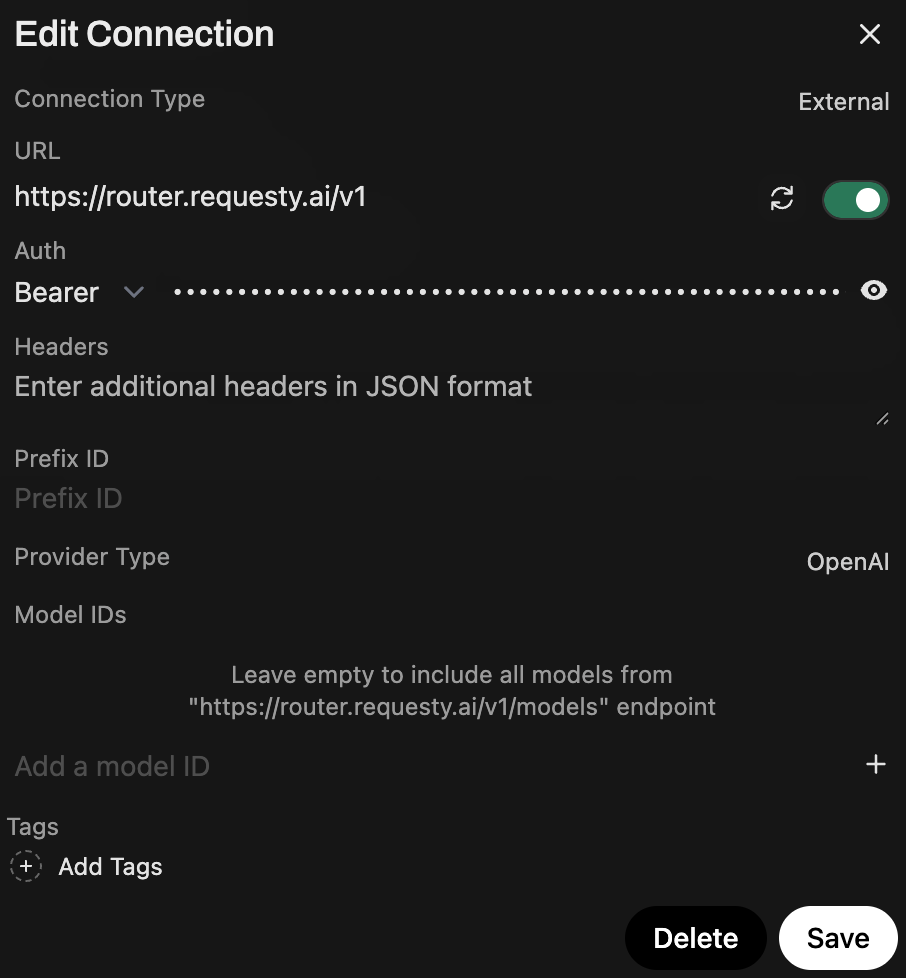
Add or Edit OpenAI Connection
- Click to edit the existing OpenAI API connection or add a new one
- Set the URL to one of:
- Global:
https://router.requesty.ai/v1 - EU only:
https://router.eu.requesty.ai/v1
- Global:
- Add your API Key from the API Keys Page
- Click Save
Available Models
Models will be automatically fetched from Requesty. Only approved models for your organization will be visible. Manage your approved models at: https://app.requesty.ai/admin-panel?tab=models View them in OpenWebUI at:/admin/settings/models
Embeddings Setup
Navigate to:/admin/settings/documents
- Under Embedding Model Engine, select OpenAI
- Overwrite base_url with:
https://router.requesty.ai/v1 - Add your Requesty API key
- Save your settings

Speech-to-Text Setup
Navigate to:/admin/settings/audio
Requesty currently supports Speech-to-Text only (not Text-to-Speech).
- Set the base URL to:
https://router.requesty.ai/v1 - Select OpenAI as the provider
- Use model:
openai/whisper-1(or any other supported Whisper model) - Add your Requesty API key
- Save your settings
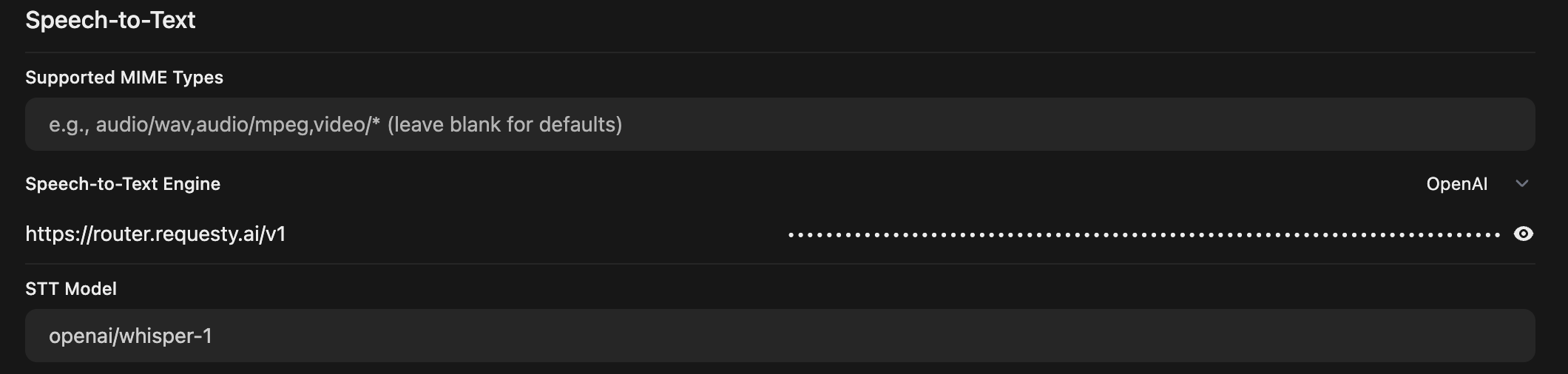
Image Generation Setup
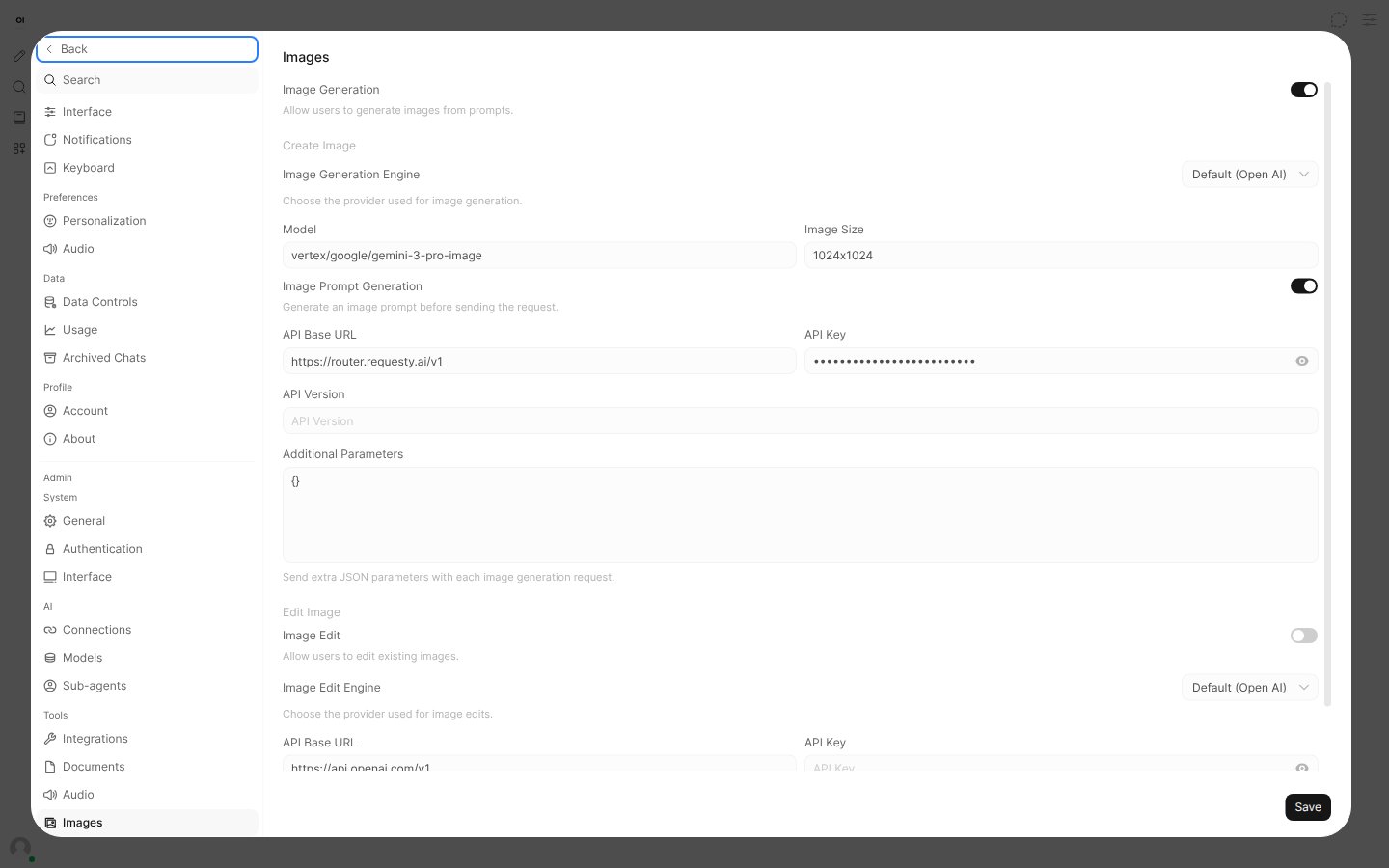
Navigate to:/admin/settings/images
- Set the base URL to:
https://router.requesty.ai/v1 - Select OpenAI as the default provider
- Use a model like:
vertex/google/gemini-3-pro-image - Customize the image prompt if desired
- Add your Requesty API key
- Save your settings
Analytics & Usage Tracking
WithENABLE_FORWARD_USER_INFO_HEADERS=true enabled, you can track detailed usage analytics by user email, model, and more.
Visual Analytics Dashboard
View a complete breakdown of spending per customer in the Requesty analytics dashboard: View Spend by User Email →
- Cost per user (grouped by email)
- Usage patterns over time
- Model-specific spending breakdowns
- Interactive time-series visualizations
Programmatic Analytics
You can also retrieve usage statistics programmatically using the Requesty Management API. This is useful for building custom dashboards or billing integrations.Get Usage by User Email
Use theextra.X-Openwebui-User-Email field to group usage by OpenWebUI user: