> ## Documentation Index
> Fetch the complete documentation index at: https://docs.requesty.ai/llms.txt
> Use this file to discover all available pages before exploring further.
# OpenWebUI
> Complete integration guide for using Requesty with OpenWebUI
**Everything you need in one integration**: Integrate Requesty with OpenWebUI to access **400+ AI models** through a single, unified interface. Get chat completions, embeddings, speech-to-text, and image generation - all with the flexibility to choose between regions and create your own routing policies.
## How It Works
```mermaid theme={"dark"}
sequenceDiagram
participant User as OpenWebUI
participant Router as Requesty Router
participant AI as Model Providers
User->>Router: GET /v1/models
Router-->>User: Return Approved Models
User->>Router: POST Request (Chat/Embed/Audio)
rect rgb(30, 30, 46)
Note right of Router: 🛡️ Security Layer
Router->>Router: Verify API Key & Permissions
Note right of Router: 🧠 Routing Engine
Router->>Router: Check Cache → Select Provider → Apply Fallback
Note right of Router: 🔄 Adaptor Layer
Router->>Router: Transform to Provider Format
end
Router->>AI: Execute Request
AI-->>Router: Raw Output
rect rgb(30, 30, 46)
Note right of Router: 📊 Analytics Engine: Store Usage
end
Router-->>User: Normalized Response
```
**Why use Requesty instead of managing providers yourself?**
One URL (`https://router.requesty.ai/v1`) replaces dozens of provider-specific endpoints
Single invoice for all model providers, no need to manage multiple subscriptions
Track usage by user email, model, cost, and time with built-in dashboards
Intelligent response caching and optimization reduces costs and improves speed
**What Requesty handles automatically:**
* ✅ Model availability discovery via `/v1/models`
* ✅ Request transformation for different providers
* ✅ Response caching and optimization
* ✅ User tracking and analytics collection
* ✅ Regional routing and failover
* ✅ Rate limiting and quota management
## Important: Enable User Tracking
**Required for Analytics**: Add this to your OpenWebUI YAML configuration to enable user tracking in analytics:
```yaml theme={"dark"}
ENABLE_FORWARD_USER_INFO_HEADERS=true
```
Without this setting, you won't be able to track usage by user email in your analytics.
## Connection Setup
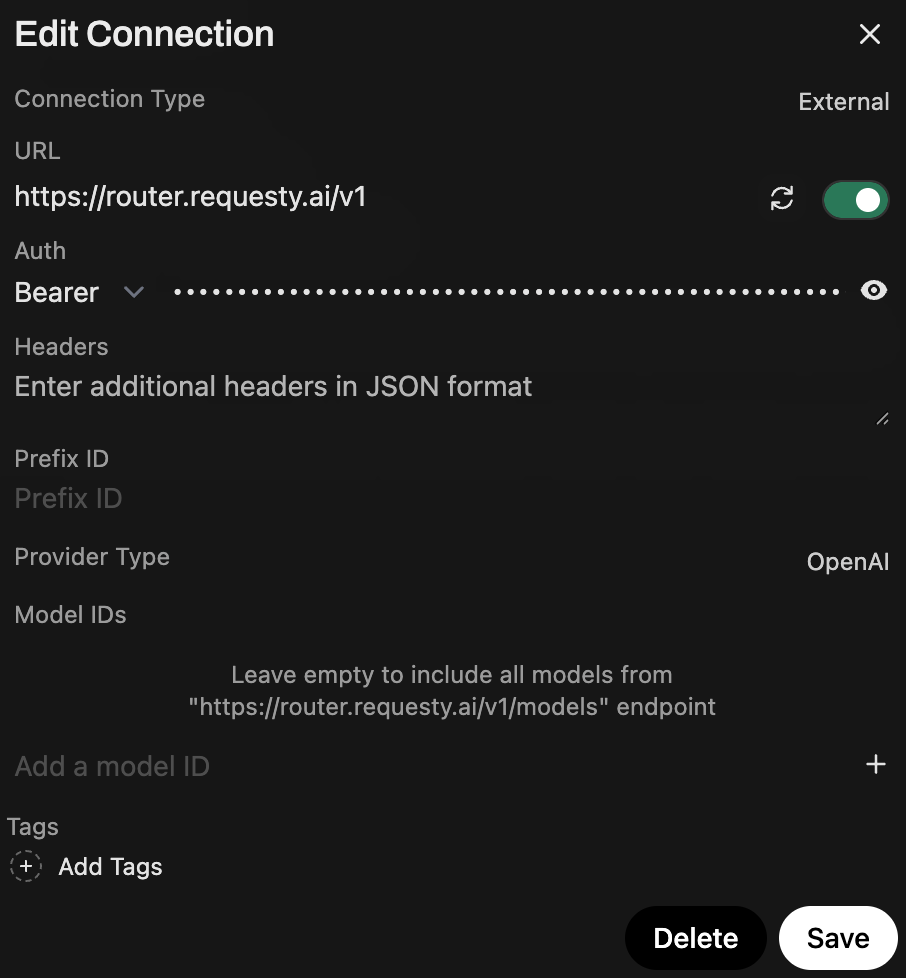
Navigate to: `/admin/settings/connections`
### Add or Edit OpenAI Connection
1. Click to edit the existing OpenAI API connection or add a new one
2. Set the **URL** to one of:
* Global: `https://router.requesty.ai/v1`
* EU only: `https://router.eu.requesty.ai/v1`
3. Add your **API Key** from the [API Keys Page](https://app.requesty.ai/api-keys)
4. Click **Save**
 ### Available Models
Models will be automatically fetched from Requesty. **Only approved models for your organization will be visible.**
Manage your approved models at: [https://app.requesty.ai/admin-panel?tab=models](https://app.requesty.ai/admin-panel?tab=models)
View them in OpenWebUI at: `/admin/settings/models`
## Embeddings Setup
Navigate to: `/admin/settings/documents`
1. Under **Embedding Model Engine**, select **OpenAI**
2. **Overwrite base\_url** with: `https://router.requesty.ai/v1`
3. Add your Requesty API key
4. Save your settings
### Available Models
Models will be automatically fetched from Requesty. **Only approved models for your organization will be visible.**
Manage your approved models at: [https://app.requesty.ai/admin-panel?tab=models](https://app.requesty.ai/admin-panel?tab=models)
View them in OpenWebUI at: `/admin/settings/models`
## Embeddings Setup
Navigate to: `/admin/settings/documents`
1. Under **Embedding Model Engine**, select **OpenAI**
2. **Overwrite base\_url** with: `https://router.requesty.ai/v1`
3. Add your Requesty API key
4. Save your settings
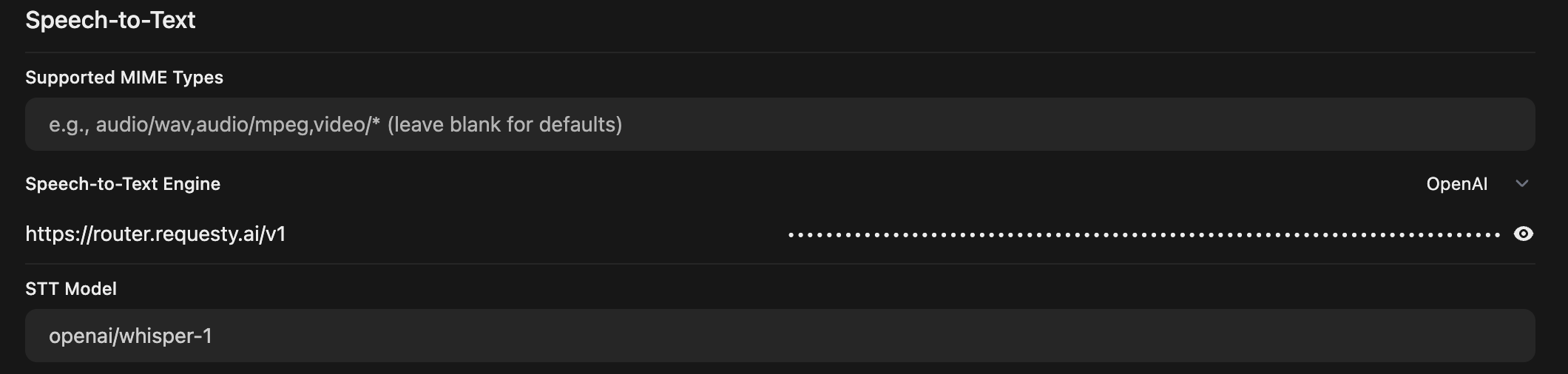
 ## Speech-to-Text Setup
Navigate to: `/admin/settings/audio`
Requesty currently supports **Speech-to-Text only** (not Text-to-Speech).
1. Set the **base URL** to: `https://router.requesty.ai/v1`
2. Select **OpenAI** as the provider
3. Use model: `openai/whisper-1` (or any other supported Whisper model)
4. Add your Requesty API key
5. Save your settings
## Speech-to-Text Setup
Navigate to: `/admin/settings/audio`
Requesty currently supports **Speech-to-Text only** (not Text-to-Speech).
1. Set the **base URL** to: `https://router.requesty.ai/v1`
2. Select **OpenAI** as the provider
3. Use model: `openai/whisper-1` (or any other supported Whisper model)
4. Add your Requesty API key
5. Save your settings
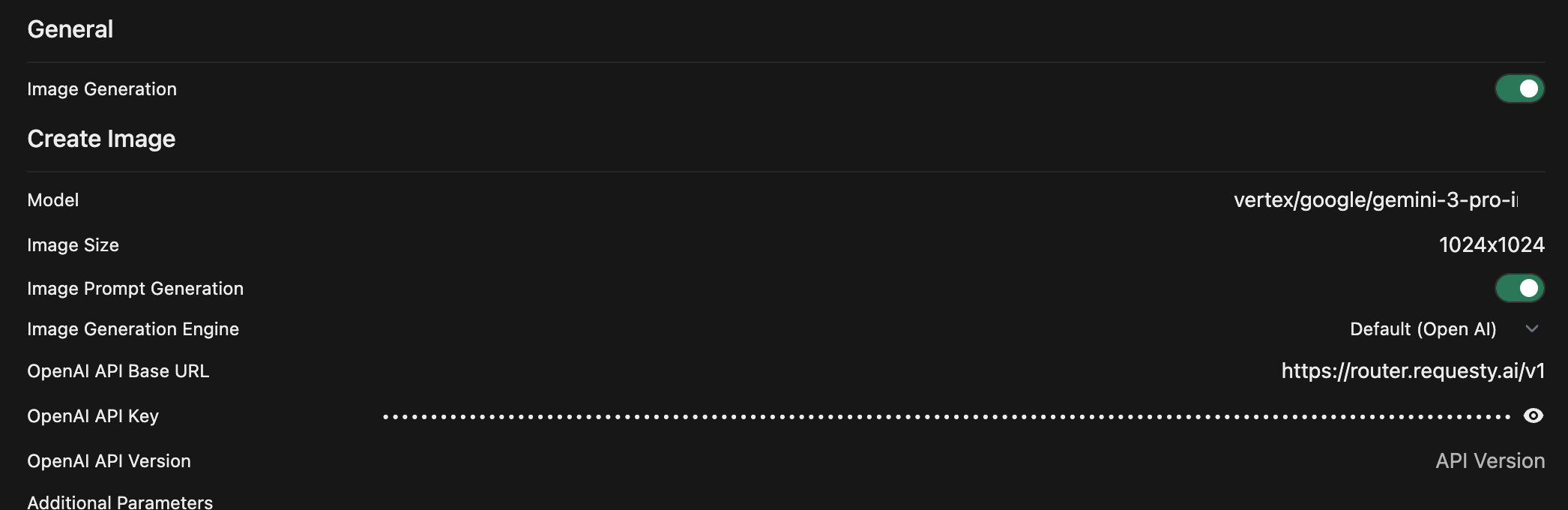
 ## Image Generation Setup
Navigate to: `/admin/settings/images`
1. Set the **base URL** to: `https://router.requesty.ai/v1`
2. Select **OpenAI** as the default provider
3. Use a model like: `vertex/google/gemini-3-pro-image-preview`
4. Customize the image prompt if desired
5. Add your Requesty API key
6. Save your settings
## Image Generation Setup
Navigate to: `/admin/settings/images`
1. Set the **base URL** to: `https://router.requesty.ai/v1`
2. Select **OpenAI** as the default provider
3. Use a model like: `vertex/google/gemini-3-pro-image-preview`
4. Customize the image prompt if desired
5. Add your Requesty API key
6. Save your settings
 ## Analytics & Usage Tracking
With `ENABLE_FORWARD_USER_INFO_HEADERS=true` enabled, you can track detailed usage analytics by user email, model, and more.
### Visual Analytics Dashboard
View a complete breakdown of spending per customer in the Requesty analytics dashboard:
[**View Spend by User Email →**](https://app.requesty.ai/analytics/advanced?groupBy=extra.X-Openwebui-User-Email\&metric=cost\&aggMethod=sum\&timeRange=7d\&timeGroup=day\®ularChart=bar\&breakdownChart=bar\&hidden=vertex%2Fgemini-2.5-flash%2Copenai%2Fgpt-5-mini%3Apriority%2Cbedrock%2Fclaude-sonnet-4-5%2Cbedrock%2Fclaude-sonnet-4-5%40us-west-2%2Cbedrock%2Fclaude-opus-4-5%2Cbedrock%2Fclaude-sonnet-4-5%40us-east-1%2Copenai%2Fgpt-5%3Apriority%2Cbedrock%2Fclaude-sonnet-4%40us-east-1%2Cbedrock%2Fclaude-opus-4%40us-east-2%2Cbedrock%2Fclaude-haiku-4-5%40eu-west-1%2Canthropic%2Fclaude-sonnet-4%2Cbedrock%2Fclaude-sonnet-4%40eu-west-1%2Cbedrock%2Fclaude-opus-4%2Cbedrock%2Fclaude-opus-4%40us-east-1%2Cbedrock%2Fclaude-3-7-sonnet%2Cbedrock%2Fclaude-sonnet-4-5%40eu-west-1%2Cbedrock%2Fclaude-sonnet-4%2Cbedrock%2Fclaude-3-7-sonnet%40eu-west-1%2Cbedrock%2Fclaude-haiku-4-5%40us-east-1%2Cbedrock%2Fclaude-3-7-sonnet%40us-east-1%2Cbedrock%2Fclaude-3-7-sonnet%40eu-west-3%2Cbedrock%2Fclaude-opus-4%40us-west-2%2Cbedrock%2Fclaude-3-7-sonnet%40eu-north-1%2Cbedrock%2Fclaude-sonnet-4%40eu-west-3%2Cbedrock%2Fclaude-sonnet-4-5%40eu-north-1%2Cbedrock%2Fclaude-sonnet-4%40eu-north-1%2Cbedrock%2Fclaude-sonnet-4%40eu-central-1%2Cbedrock%2Fclaude-3-7-sonnet%40eu-central-1%2Cbedrock%2Fclaude-sonnet-4%40us-west-2%2Cbedrock%2Fclaude-3-7-sonnet%40us-west-2%2Cbedrock%2Fclaude-haiku-4-5%2Cbedrock%2Fclaude-sonnet-4%40us-east-2%2Cbedrock%2Fclaude-sonnet-4-5%40eu-central-1%2Cbedrock%2Fclaude-3-7-sonnet%40us-east-2%2Cbedrock%2Fclaude-haiku-4-5%40eu-west-3%2Cbedrock%2Fclaude-haiku-4-5%40eu-north-1%2Cbedrock%2Fclaude-haiku-4-5%40us-east-2%2Cbedrock%2Fclaude-haiku-4-5%40eu-central-1%2Cbedrock%2Fclaude-sonnet-4-5%40us-east-2%2Cbedrock%2Fclaude-haiku-4-5%40us-west-2%2Cbedrock%2Fclaude-opus-4%40eu-west-1%2Copenai%2Fgpt-5.1-chat%2Cbedrock%2Fclaude-haiku-4-5%40eu-west-12%2Cxai%2Fgrok-4-1-fast%2Copenai-responses%2Fgpt-5.1-codex%2Cxai%2Fgrok-4-1-fast-non-reasoning%2Cvertex%2Fgemini-3-pro-image-preview\&origin_title=Open+WebUI)
## Analytics & Usage Tracking
With `ENABLE_FORWARD_USER_INFO_HEADERS=true` enabled, you can track detailed usage analytics by user email, model, and more.
### Visual Analytics Dashboard
View a complete breakdown of spending per customer in the Requesty analytics dashboard:
[**View Spend by User Email →**](https://app.requesty.ai/analytics/advanced?groupBy=extra.X-Openwebui-User-Email\&metric=cost\&aggMethod=sum\&timeRange=7d\&timeGroup=day\®ularChart=bar\&breakdownChart=bar\&hidden=vertex%2Fgemini-2.5-flash%2Copenai%2Fgpt-5-mini%3Apriority%2Cbedrock%2Fclaude-sonnet-4-5%2Cbedrock%2Fclaude-sonnet-4-5%40us-west-2%2Cbedrock%2Fclaude-opus-4-5%2Cbedrock%2Fclaude-sonnet-4-5%40us-east-1%2Copenai%2Fgpt-5%3Apriority%2Cbedrock%2Fclaude-sonnet-4%40us-east-1%2Cbedrock%2Fclaude-opus-4%40us-east-2%2Cbedrock%2Fclaude-haiku-4-5%40eu-west-1%2Canthropic%2Fclaude-sonnet-4%2Cbedrock%2Fclaude-sonnet-4%40eu-west-1%2Cbedrock%2Fclaude-opus-4%2Cbedrock%2Fclaude-opus-4%40us-east-1%2Cbedrock%2Fclaude-3-7-sonnet%2Cbedrock%2Fclaude-sonnet-4-5%40eu-west-1%2Cbedrock%2Fclaude-sonnet-4%2Cbedrock%2Fclaude-3-7-sonnet%40eu-west-1%2Cbedrock%2Fclaude-haiku-4-5%40us-east-1%2Cbedrock%2Fclaude-3-7-sonnet%40us-east-1%2Cbedrock%2Fclaude-3-7-sonnet%40eu-west-3%2Cbedrock%2Fclaude-opus-4%40us-west-2%2Cbedrock%2Fclaude-3-7-sonnet%40eu-north-1%2Cbedrock%2Fclaude-sonnet-4%40eu-west-3%2Cbedrock%2Fclaude-sonnet-4-5%40eu-north-1%2Cbedrock%2Fclaude-sonnet-4%40eu-north-1%2Cbedrock%2Fclaude-sonnet-4%40eu-central-1%2Cbedrock%2Fclaude-3-7-sonnet%40eu-central-1%2Cbedrock%2Fclaude-sonnet-4%40us-west-2%2Cbedrock%2Fclaude-3-7-sonnet%40us-west-2%2Cbedrock%2Fclaude-haiku-4-5%2Cbedrock%2Fclaude-sonnet-4%40us-east-2%2Cbedrock%2Fclaude-sonnet-4-5%40eu-central-1%2Cbedrock%2Fclaude-3-7-sonnet%40us-east-2%2Cbedrock%2Fclaude-haiku-4-5%40eu-west-3%2Cbedrock%2Fclaude-haiku-4-5%40eu-north-1%2Cbedrock%2Fclaude-haiku-4-5%40us-east-2%2Cbedrock%2Fclaude-haiku-4-5%40eu-central-1%2Cbedrock%2Fclaude-sonnet-4-5%40us-east-2%2Cbedrock%2Fclaude-haiku-4-5%40us-west-2%2Cbedrock%2Fclaude-opus-4%40eu-west-1%2Copenai%2Fgpt-5.1-chat%2Cbedrock%2Fclaude-haiku-4-5%40eu-west-12%2Cxai%2Fgrok-4-1-fast%2Copenai-responses%2Fgpt-5.1-codex%2Cxai%2Fgrok-4-1-fast-non-reasoning%2Cvertex%2Fgemini-3-pro-image-preview\&origin_title=Open+WebUI)
 This dashboard provides real-time insights into:
* Cost per user (grouped by email)
* Usage patterns over time
* Model-specific spending breakdowns
* Interactive time-series visualizations
## Programmatic Analytics
You can also retrieve usage statistics programmatically using the Requesty Management API. This is useful for building custom dashboards or billing integrations.
### Get Usage by User Email
Use the `extra.X-Openwebui-User-Email` field to group usage by OpenWebUI user:
```bash theme={"dark"}
curl -X GET "https://api-v2.requesty.ai/v1/manage/apikey/{id}/usage" \
-H "Authorization: Bearer REQUESTY_API_KEY" \
-H "Content-Type: application/json" \
-d '{
"start": "2025-11-01T00:00:00Z",
"end": "2025-11-30T23:59:59Z",
"group_by": ["extra.X-Openwebui-User-Email"],
"resolution": "day"
}'
```
**Example Response:**
```json theme={"dark"}
{
"usage": {
"2025-11-29": {
"spend": "0.13484955",
"total_tokens": 36398,
"grouped_data": [{
"group_by_values": {
"extra.X-Openwebui-User-Email": "thibault@requesty.ai"
},
"spend": "0.13484955",
"total_tokens": 36398
}]
}
}
}
```
## Resources
* [OpenWebUI Documentation](https://docs.openwebui.com/)
* [Requesty API Keys](https://app.requesty.ai/api-keys)
* [Requesty Platform](https://app.requesty.ai)
This dashboard provides real-time insights into:
* Cost per user (grouped by email)
* Usage patterns over time
* Model-specific spending breakdowns
* Interactive time-series visualizations
## Programmatic Analytics
You can also retrieve usage statistics programmatically using the Requesty Management API. This is useful for building custom dashboards or billing integrations.
### Get Usage by User Email
Use the `extra.X-Openwebui-User-Email` field to group usage by OpenWebUI user:
```bash theme={"dark"}
curl -X GET "https://api-v2.requesty.ai/v1/manage/apikey/{id}/usage" \
-H "Authorization: Bearer REQUESTY_API_KEY" \
-H "Content-Type: application/json" \
-d '{
"start": "2025-11-01T00:00:00Z",
"end": "2025-11-30T23:59:59Z",
"group_by": ["extra.X-Openwebui-User-Email"],
"resolution": "day"
}'
```
**Example Response:**
```json theme={"dark"}
{
"usage": {
"2025-11-29": {
"spend": "0.13484955",
"total_tokens": 36398,
"grouped_data": [{
"group_by_values": {
"extra.X-Openwebui-User-Email": "thibault@requesty.ai"
},
"spend": "0.13484955",
"total_tokens": 36398
}]
}
}
}
```
## Resources
* [OpenWebUI Documentation](https://docs.openwebui.com/)
* [Requesty API Keys](https://app.requesty.ai/api-keys)
* [Requesty Platform](https://app.requesty.ai)