> ## Documentation Index
> Fetch the complete documentation index at: https://docs.requesty.ai/llms.txt
> Use this file to discover all available pages before exploring further.
# Claude Cowork
> Route Claude Desktop (Cowork) through Requesty to access 300+ models with a single gateway
[Claude Cowork](https://www.anthropic.com/product/claude-cowork) is Anthropic's desktop app for working with Claude. It now ships with a built-in **Third-Party Inference** mode. Once enabled, Claude Cowork sends every request to the Anthropic-compatible gateway of your choice instead of Anthropic's cloud.
Point it at Requesty and you get:
* **300+ models** available directly from the Claude Cowork model picker: Sonnet, Opus, Haiku, GPT, Gemini, Mistral, Llama, and more.
* **Policies** for [Fallback](/features/fallback-policies), [Load Balancing](/features/load-balancing-policies), and [Latency Routing](/features/latency-routing) without changing a thing on the client.
* **Spend tracking**: every Cowork session shows up in [usage analytics](/features/usage-analytics) and [cost tracking](/features/cost-tracking), tagged as Claude Cowork traffic via the `X-Title` header.
* **No Anthropic account required**. "Continue with Gateway" lets teams use Claude Cowork with just a Requesty key.
* **Enterprise deployment**: export a `.mobileconfig` (macOS) or `.reg` (Windows) file from the Cowork setup UI to roll the Requesty configuration out via MDM / Group Policy.
## How it works
```mermaid theme={"dark"}
sequenceDiagram
participant CC as Claude Cowork
participant RQ as Requesty Router
participant AI as Model Providers
CC->>RQ: POST /v1/messages (Authorization: Bearer ..., X-Title: Claude-Cowork)
rect rgb(30, 30, 46)
Note right of RQ: Authenticate, apply policy, route
end
RQ->>AI: Forward to best provider (Anthropic, Bedrock, Vertex, OpenAI, ...)
AI-->>RQ: Response
RQ-->>CC: Anthropic-compatible response
```
## Prerequisites
* **Claude Cowork** installed. [Download from Anthropic](https://claude.ai/download).
* A **Requesty API key** from the [API Keys page](https://app.requesty.ai/api-keys).
## Configuration
Open Claude Cowork (no sign-in required) and go to **Help > Troubleshooting > Enable Developer Mode**.
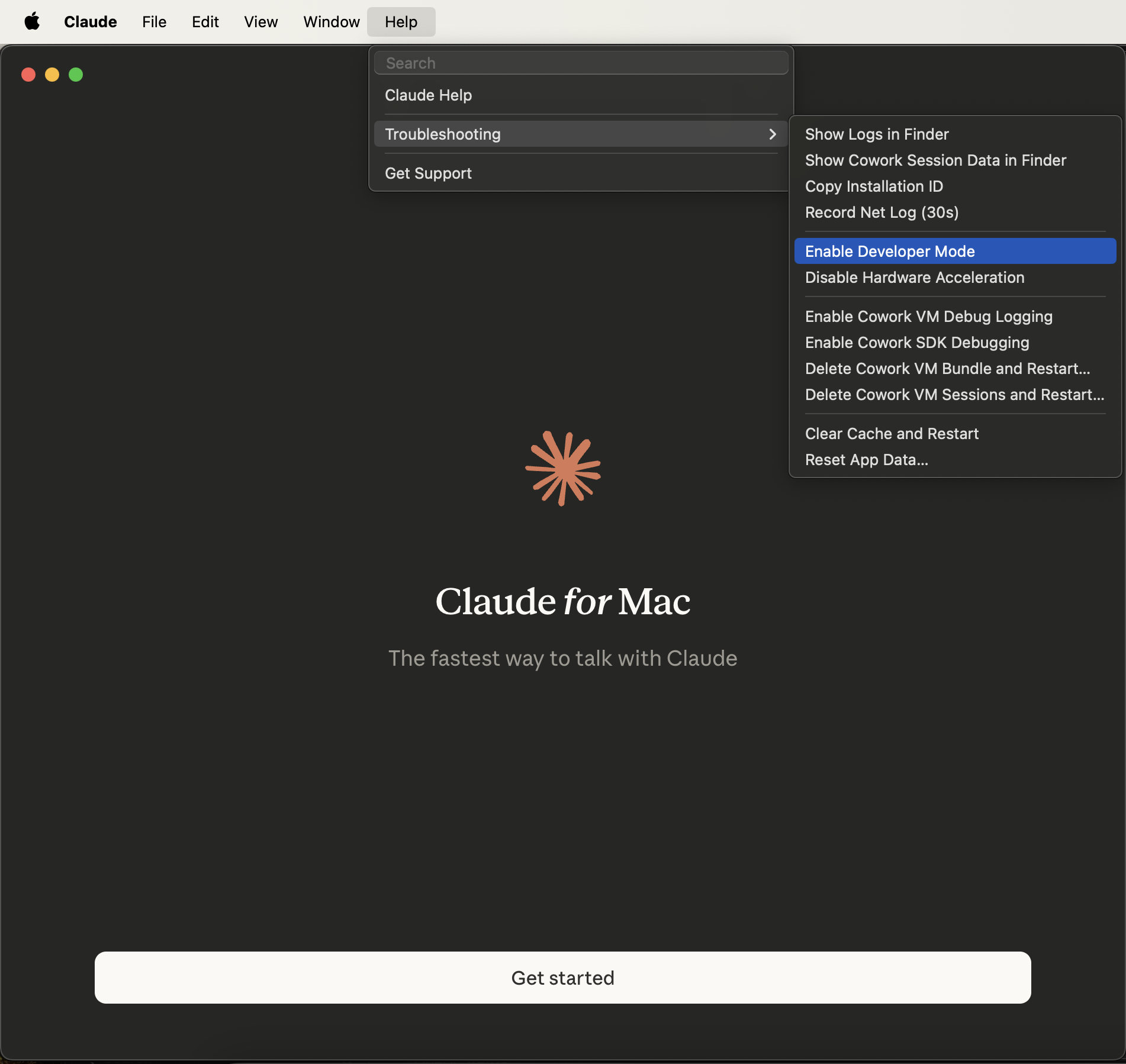 A new **Developer** menu appears in the menu bar.
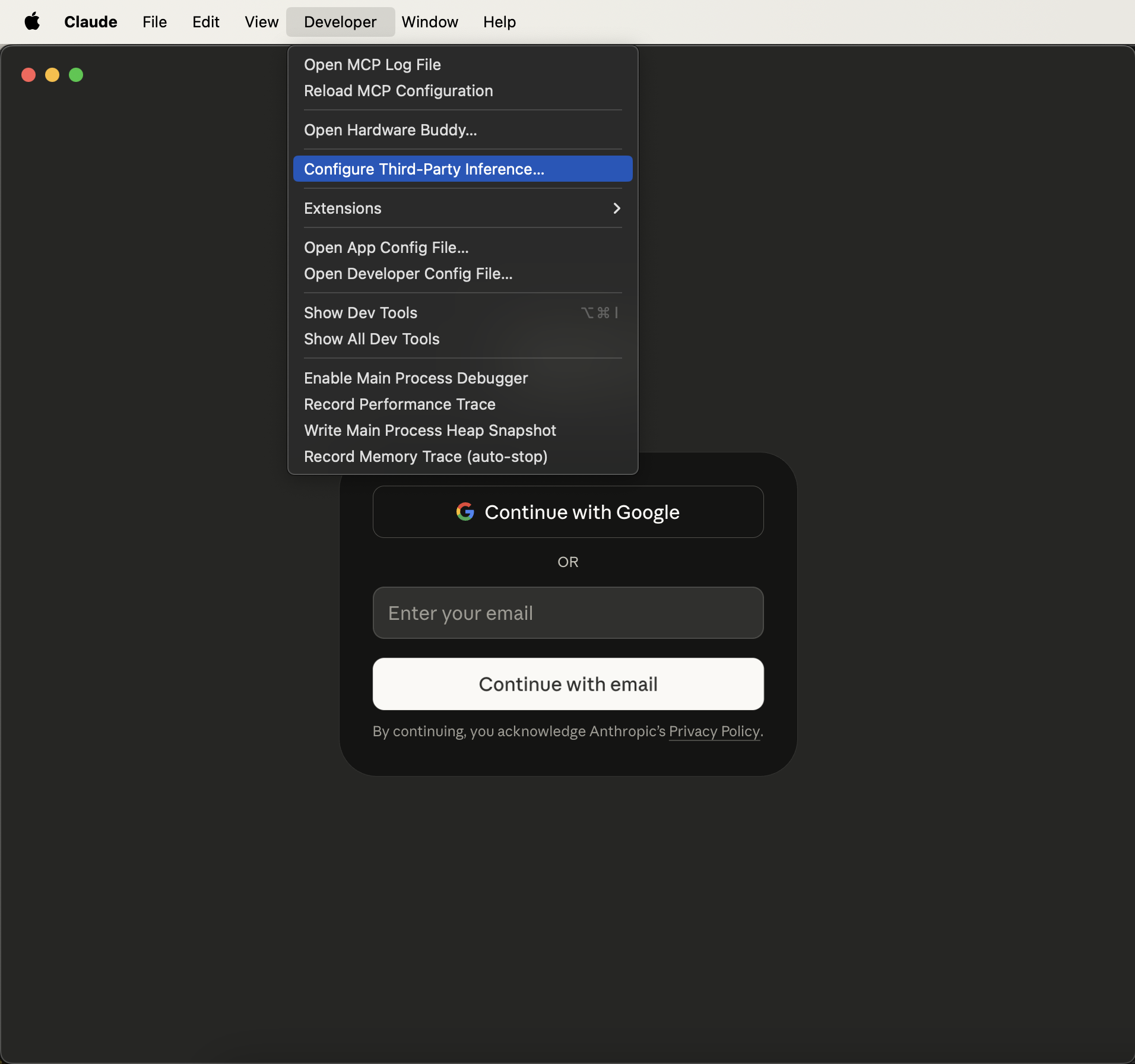
From the new menu bar item, choose **Developer > Configure Third-Party Inference**.
A new **Developer** menu appears in the menu bar.
From the new menu bar item, choose **Developer > Configure Third-Party Inference**.
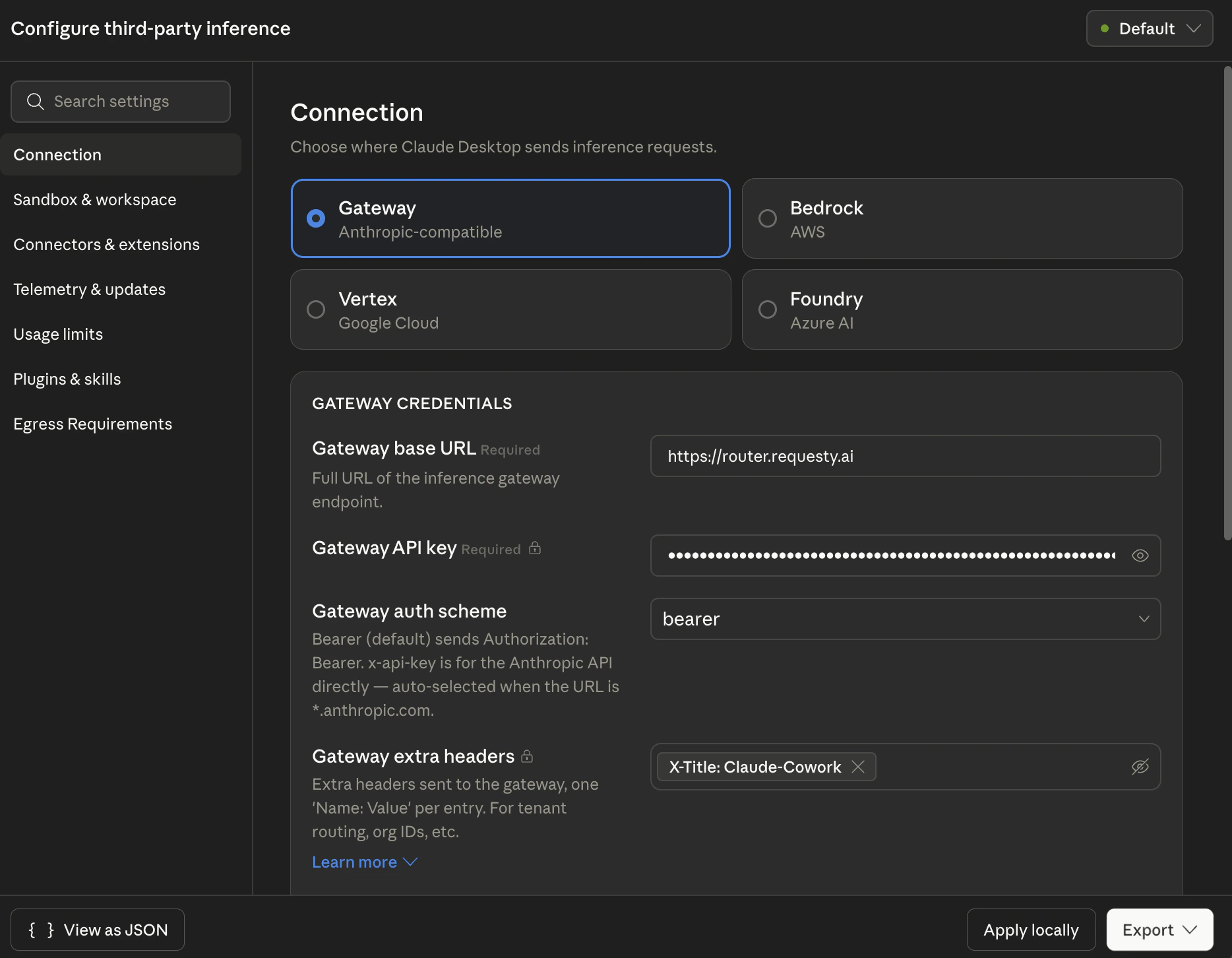
 In the **Configure third-party inference** panel, pick **Gateway** (Anthropic-compatible) as the inference backend and enter:
| Field | Value |
| ------------------------- | ---------------------------- |
| **Gateway base URL** | `https://router.requesty.ai` |
| **Gateway API key** | Your Requesty API key |
| **Gateway auth scheme** | `bearer` |
| **Gateway extra headers** | `X-Title: Claude-Cowork` |
In the **Configure third-party inference** panel, pick **Gateway** (Anthropic-compatible) as the inference backend and enter:
| Field | Value |
| ------------------------- | ---------------------------- |
| **Gateway base URL** | `https://router.requesty.ai` |
| **Gateway API key** | Your Requesty API key |
| **Gateway auth scheme** | `bearer` |
| **Gateway extra headers** | `X-Title: Claude-Cowork` |
 **Why `X-Title: Claude-Cowork`?** Requesty reads the [`X-Title`](/quickstart#optional-headers) header to tag requests in analytics. Setting it to `Claude-Cowork` lets you filter Cowork traffic separately from your API, Claude Code, or Cline usage in [Usage Analytics](/features/usage-analytics) and [Cost Tracking](/features/cost-tracking). You can use any value you like, for example `Claude-Cowork-Design-Team`, to segment further.
Click **Apply locally** to save. Use **Export** if you want a `.mobileconfig` for macOS MDM or a `.reg` file for Windows Group Policy / Intune (see [MDM deployment](#mdm-deployment) below).
The other three backends (**Bedrock**, **Vertex**, **Foundry**) talk directly to AWS / GCP / Azure and bypass Requesty. Use **Gateway** if you want routing, fallbacks, spend tracking, and access to non-Anthropic models.
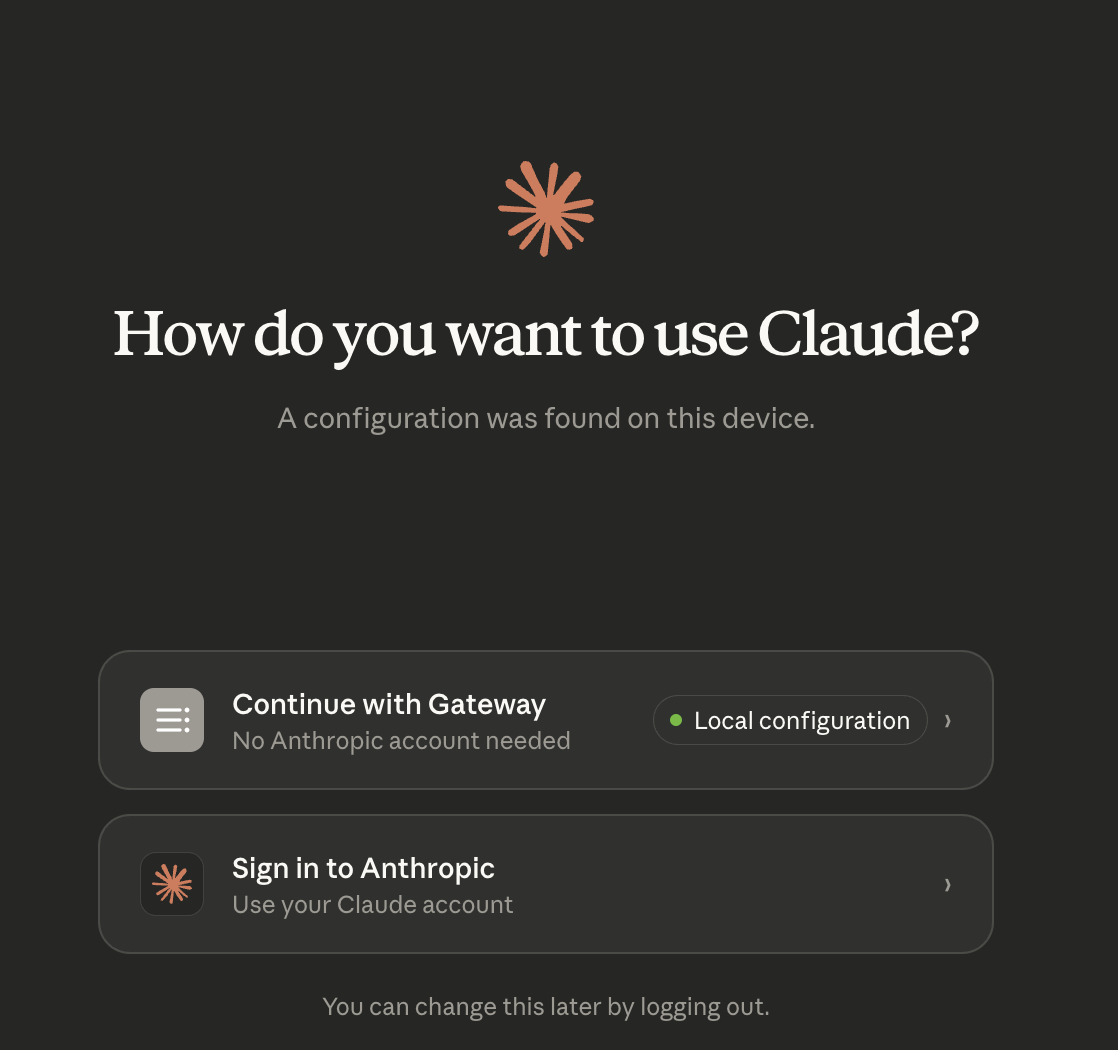
Quit and reopen Claude Cowork. On launch you'll see a chooser. Pick **Continue with Gateway** (labeled *Local configuration*). No Anthropic account is needed.
**Why `X-Title: Claude-Cowork`?** Requesty reads the [`X-Title`](/quickstart#optional-headers) header to tag requests in analytics. Setting it to `Claude-Cowork` lets you filter Cowork traffic separately from your API, Claude Code, or Cline usage in [Usage Analytics](/features/usage-analytics) and [Cost Tracking](/features/cost-tracking). You can use any value you like, for example `Claude-Cowork-Design-Team`, to segment further.
Click **Apply locally** to save. Use **Export** if you want a `.mobileconfig` for macOS MDM or a `.reg` file for Windows Group Policy / Intune (see [MDM deployment](#mdm-deployment) below).
The other three backends (**Bedrock**, **Vertex**, **Foundry**) talk directly to AWS / GCP / Azure and bypass Requesty. Use **Gateway** if you want routing, fallbacks, spend tracking, and access to non-Anthropic models.
Quit and reopen Claude Cowork. On launch you'll see a chooser. Pick **Continue with Gateway** (labeled *Local configuration*). No Anthropic account is needed.
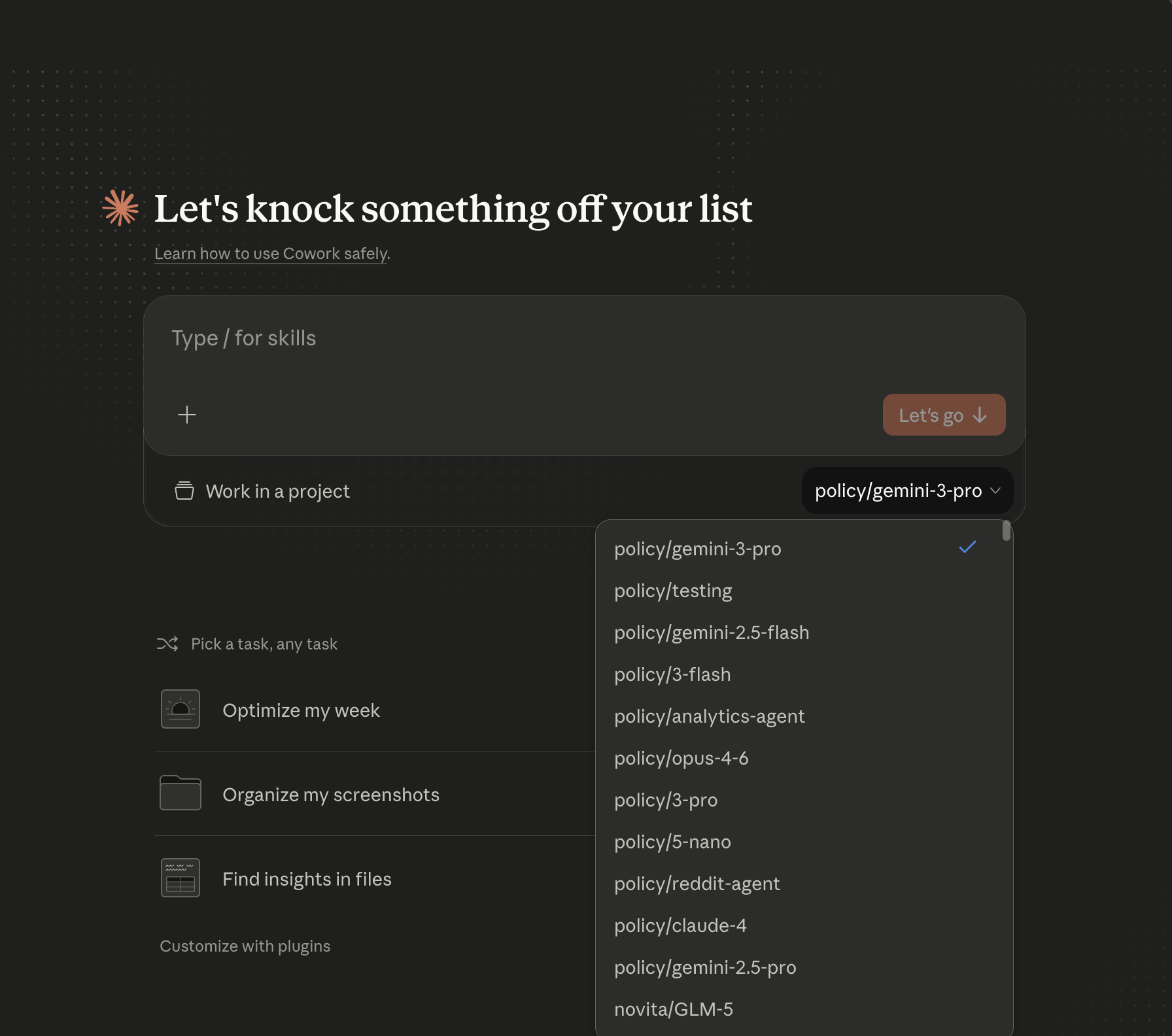
 The model picker in the top-right now lists every model and policy your Requesty org has access to. Select one and start working.
 ## Model selection
Any entry from the [Model Library](https://app.requesty.ai/model-list) works. Model IDs follow the familiar `provider/model-name` format:
| Provider | Example |
| ---------------------- | ------------------------------- |
| Anthropic | `anthropic/claude-sonnet-4-5` |
| Anthropic (1M context) | `anthropic/claude-opus-4-6[1m]` |
| OpenAI | `openai/gpt-4o` |
| Google | `google/gemini-2.5-pro` |
| AWS Bedrock | `bedrock/claude-opus-4-6` |
| Mistral | `mistral/mistral-large-latest` |
**Policies** follow `policy/`:
* `policy/reliable-sonnet-4-5`
* `policy/opus-4-6`
* `policy/gemini-3-pro`
Policies are the recommended default for Cowork. A single policy gives you automatic fallback, load balancing, and latency-aware routing without the user ever needing to pick a specific model.
To use the **1M token context window** for Opus 4.6 or Sonnet 4.5, append `[1m]` to the model name, for example `anthropic/claude-opus-4-6[1m]`.
## EU data residency
For EU-only routing, change the gateway base URL to the EU router:
```
https://router.eu.requesty.ai
```
Everything else (auth scheme, headers, model IDs) stays the same. See [EU Routing](/features/eu-routing) for the full list of EU-approved models.
## MDM deployment
The **Export** button in the Configure third-party inference panel produces a ready-to-deploy configuration file so you can roll Requesty out to an entire team:
* **macOS**: `.mobileconfig` payload you can push with Jamf, Intune, Kandji, or any Apple MDM.
* **Windows**: `.reg` file suitable for Group Policy Preferences or Intune custom profiles.
Recommended payload for a fleet rollout:
```
Gateway base URL https://router.requesty.ai
Gateway auth scheme bearer
Gateway extra headers X-Title: Claude-Cowork
Gateway API key
```
Issue one Requesty key per user (or per team) from the [API Keys page](https://app.requesty.ai/api-keys) or the [Key Management API](/features/key-management-api) so you can attribute spend, set per-user limits, and revoke individual keys without disturbing the fleet.
## Benefits of Requesty + Claude Cowork
Sonnet, Opus, GPT, Gemini, Mistral, Llama, all selectable from the Cowork picker.
Point Cowork at a policy and get fallback + load balancing without touching the client.
Filter Cowork traffic in analytics via the `X-Title: Claude-Cowork` tag.
Export `.mobileconfig` / `.reg` once and push the setup to your whole org.
## Troubleshooting
### Still seeing "Sign in to Anthropic" on launch
Claude Cowork only shows **Continue with Gateway** after a valid configuration has been saved. Re-open **Developer > Configure Third-Party Inference**, verify the four fields, and click **Apply locally** again. A full app restart is required.
### `401 Unauthorized` from the gateway
* Confirm **Gateway auth scheme** is set to `bearer` (not `x-api-key`, which is reserved for URLs ending in `*.anthropic.com`).
* Re-paste your Requesty API key. Trailing whitespace from the clipboard is a common culprit.
* Verify the key is active at [app.requesty.ai/api-keys](https://app.requesty.ai/api-keys).
### Model isn't in the picker
Cowork pulls the model list through the gateway, so the model must be approved for your Requesty org. Check:
* The model exists in the [Model Library](https://app.requesty.ai/model-list).
* It's in your org's [Approved Models](/features/approved-models) list (if your org restricts models).
* For policies, the policy name must match `policy/` exactly.
### Cowork traffic isn't tagged in analytics
Open **Developer > Configure Third-Party Inference** and confirm the **Gateway extra headers** field contains `X-Title: Claude-Cowork` (or your custom value). The header is sent on every request and surfaces in [Usage Analytics](/features/usage-analytics) as a filterable field.
### Developer menu doesn't appear
**Help > Troubleshooting > Enable Developer Mode** is a toggle. If the menu isn't showing, it may have been disabled by an MDM profile. Ask your admin, or deploy the exported `.mobileconfig` directly so end users don't need Developer Mode at all.
### Reset the configuration
**Help > Troubleshooting > Reset App Data** wipes the Cowork configuration. Useful when switching between gateway and Anthropic cloud mode during testing.
## Resources
* [Claude Cowork product page](https://www.anthropic.com/product/claude-cowork)
* [Anthropic's official Cowork third-party setup guide](https://support.claude.com/en/articles/14680741-install-and-configure-claude-cowork-with-third-party-platforms)
* [Requesty API Keys](https://app.requesty.ai/api-keys)
* [Requesty Model Library](https://app.requesty.ai/model-list)
* [Fallback Policies](/features/fallback-policies), [Load Balancing](/features/load-balancing-policies), [Latency Routing](/features/latency-routing)
* [EU Routing](/features/eu-routing)
## Model selection
Any entry from the [Model Library](https://app.requesty.ai/model-list) works. Model IDs follow the familiar `provider/model-name` format:
| Provider | Example |
| ---------------------- | ------------------------------- |
| Anthropic | `anthropic/claude-sonnet-4-5` |
| Anthropic (1M context) | `anthropic/claude-opus-4-6[1m]` |
| OpenAI | `openai/gpt-4o` |
| Google | `google/gemini-2.5-pro` |
| AWS Bedrock | `bedrock/claude-opus-4-6` |
| Mistral | `mistral/mistral-large-latest` |
**Policies** follow `policy/`:
* `policy/reliable-sonnet-4-5`
* `policy/opus-4-6`
* `policy/gemini-3-pro`
Policies are the recommended default for Cowork. A single policy gives you automatic fallback, load balancing, and latency-aware routing without the user ever needing to pick a specific model.
To use the **1M token context window** for Opus 4.6 or Sonnet 4.5, append `[1m]` to the model name, for example `anthropic/claude-opus-4-6[1m]`.
## EU data residency
For EU-only routing, change the gateway base URL to the EU router:
```
https://router.eu.requesty.ai
```
Everything else (auth scheme, headers, model IDs) stays the same. See [EU Routing](/features/eu-routing) for the full list of EU-approved models.
## MDM deployment
The **Export** button in the Configure third-party inference panel produces a ready-to-deploy configuration file so you can roll Requesty out to an entire team:
* **macOS**: `.mobileconfig` payload you can push with Jamf, Intune, Kandji, or any Apple MDM.
* **Windows**: `.reg` file suitable for Group Policy Preferences or Intune custom profiles.
Recommended payload for a fleet rollout:
```
Gateway base URL https://router.requesty.ai
Gateway auth scheme bearer
Gateway extra headers X-Title: Claude-Cowork
Gateway API key
```
Issue one Requesty key per user (or per team) from the [API Keys page](https://app.requesty.ai/api-keys) or the [Key Management API](/features/key-management-api) so you can attribute spend, set per-user limits, and revoke individual keys without disturbing the fleet.
## Benefits of Requesty + Claude Cowork
Sonnet, Opus, GPT, Gemini, Mistral, Llama, all selectable from the Cowork picker.
Point Cowork at a policy and get fallback + load balancing without touching the client.
Filter Cowork traffic in analytics via the `X-Title: Claude-Cowork` tag.
Export `.mobileconfig` / `.reg` once and push the setup to your whole org.
## Troubleshooting
### Still seeing "Sign in to Anthropic" on launch
Claude Cowork only shows **Continue with Gateway** after a valid configuration has been saved. Re-open **Developer > Configure Third-Party Inference**, verify the four fields, and click **Apply locally** again. A full app restart is required.
### `401 Unauthorized` from the gateway
* Confirm **Gateway auth scheme** is set to `bearer` (not `x-api-key`, which is reserved for URLs ending in `*.anthropic.com`).
* Re-paste your Requesty API key. Trailing whitespace from the clipboard is a common culprit.
* Verify the key is active at [app.requesty.ai/api-keys](https://app.requesty.ai/api-keys).
### Model isn't in the picker
Cowork pulls the model list through the gateway, so the model must be approved for your Requesty org. Check:
* The model exists in the [Model Library](https://app.requesty.ai/model-list).
* It's in your org's [Approved Models](/features/approved-models) list (if your org restricts models).
* For policies, the policy name must match `policy/` exactly.
### Cowork traffic isn't tagged in analytics
Open **Developer > Configure Third-Party Inference** and confirm the **Gateway extra headers** field contains `X-Title: Claude-Cowork` (or your custom value). The header is sent on every request and surfaces in [Usage Analytics](/features/usage-analytics) as a filterable field.
### Developer menu doesn't appear
**Help > Troubleshooting > Enable Developer Mode** is a toggle. If the menu isn't showing, it may have been disabled by an MDM profile. Ask your admin, or deploy the exported `.mobileconfig` directly so end users don't need Developer Mode at all.
### Reset the configuration
**Help > Troubleshooting > Reset App Data** wipes the Cowork configuration. Useful when switching between gateway and Anthropic cloud mode during testing.
## Resources
* [Claude Cowork product page](https://www.anthropic.com/product/claude-cowork)
* [Anthropic's official Cowork third-party setup guide](https://support.claude.com/en/articles/14680741-install-and-configure-claude-cowork-with-third-party-platforms)
* [Requesty API Keys](https://app.requesty.ai/api-keys)
* [Requesty Model Library](https://app.requesty.ai/model-list)
* [Fallback Policies](/features/fallback-policies), [Load Balancing](/features/load-balancing-policies), [Latency Routing](/features/latency-routing)
* [EU Routing](/features/eu-routing)