> ## Documentation Index
> Fetch the complete documentation index at: https://docs.requesty.ai/llms.txt
> Use this file to discover all available pages before exploring further.
# Latency-Based Routing
> Automatically route to the fastest available model
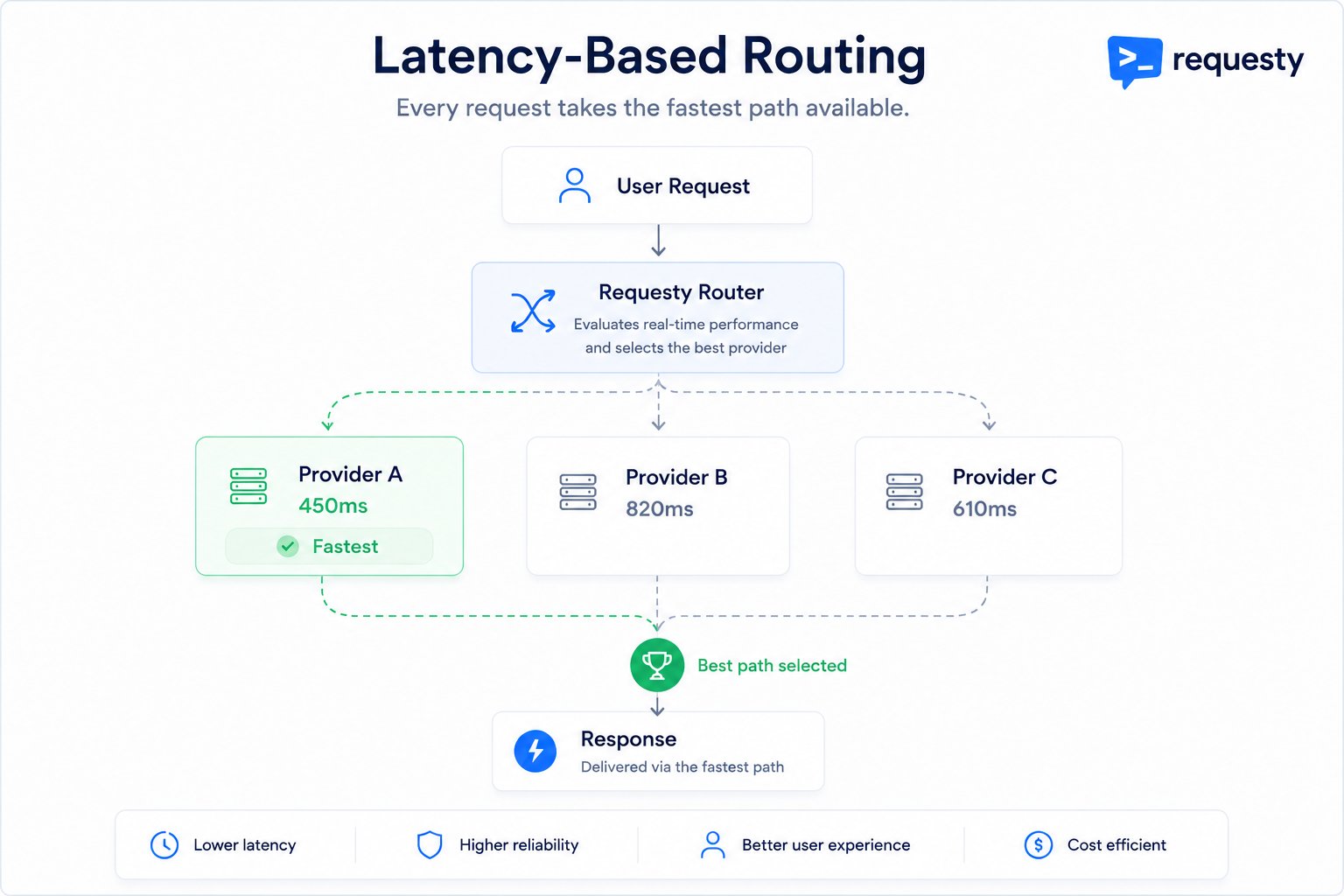
Latency-Based Routing automatically selects the **fastest model** for each request based on real-time performance data. Requesty continuously monitors response times and routes to the lowest-latency option.
 **[Enable latency routing](https://app.requesty.ai/routing-policies)** in the Requesty Console.
## How It Works
Requesty continuously measures how every model in your policy is performing right now, across all traffic flowing through the router. Recent requests count more than older ones, so the picture reflects current conditions rather than yesterday's averages.
When a request arrives, the router scores every model in your policy. The score accounts for how fast each one starts responding, how quickly it generates the rest of the output, and how much of each it has actually observed recently. Models with little recent data are scored optimistically so they still get tried.
The router orders candidates fastest-first and sends your request to the top one. If it fails, the request automatically falls through to the next-fastest, and so on down the list.
The result: traffic continuously shifts toward whatever is fastest at the moment, with no manual tuning, and it adapts within minutes when a provider slows down or recovers.
## Benefits
Always use the quickest model available.
Router adjusts when model performance changes.
Latency optimization happens automatically.
Automatically prefer nearby endpoints.
## Creating a Latency-Based Policy
Go to [Routing Policies](https://app.requesty.ai/routing-policies), click **Create Policy**, and select **Latency** as the policy type.
**[Enable latency routing](https://app.requesty.ai/routing-policies)** in the Requesty Console.
## How It Works
Requesty continuously measures how every model in your policy is performing right now, across all traffic flowing through the router. Recent requests count more than older ones, so the picture reflects current conditions rather than yesterday's averages.
When a request arrives, the router scores every model in your policy. The score accounts for how fast each one starts responding, how quickly it generates the rest of the output, and how much of each it has actually observed recently. Models with little recent data are scored optimistically so they still get tried.
The router orders candidates fastest-first and sends your request to the top one. If it fails, the request automatically falls through to the next-fastest, and so on down the list.
The result: traffic continuously shifts toward whatever is fastest at the moment, with no manual tuning, and it adapts within minutes when a provider slows down or recovers.
## Benefits
Always use the quickest model available.
Router adjusts when model performance changes.
Latency optimization happens automatically.
Automatically prefer nearby endpoints.
## Creating a Latency-Based Policy
Go to [Routing Policies](https://app.requesty.ai/routing-policies), click **Create Policy**, and select **Latency** as the policy type.
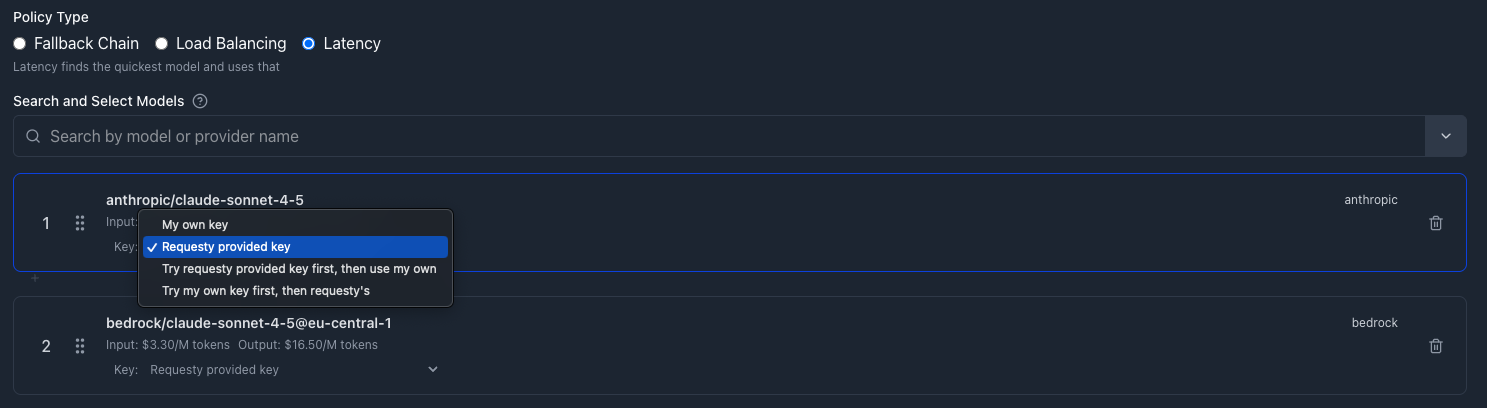 Add your models. For example:
| Model | Description |
| ---------------------------------------- | ----------------- |
| `anthropic/claude-sonnet-4-5` | Direct API access |
| `bedrock/claude-sonnet-4-5@eu-central-1` | Regional endpoint |
The router will automatically choose whichever is faster at request time.
Reference the policy in your model parameter:
```python Python theme={"dark"}
from openai import OpenAI
client = OpenAI(
base_url="https://router.requesty.ai/v1",
api_key="your-requesty-api-key"
)
response = client.chat.completions.create(
model="policy/fastest-sonnet",
messages=[{"role": "user", "content": "Hello!"}]
)
```
```typescript TypeScript theme={"dark"}
import OpenAI from 'openai';
const client = new OpenAI({
baseURL: 'https://router.requesty.ai/v1',
apiKey: 'your-requesty-api-key'
});
const response = await client.chat.completions.create({
model: 'policy/fastest-sonnet',
messages: [{ role: 'user', content: 'Hello!' }]
});
```
```bash cURL theme={"dark"}
curl https://router.requesty.ai/v1/chat/completions \
-H "Content-Type: application/json" \
-H "Authorization: Bearer your-requesty-api-key" \
-d '{
"model": "policy/fastest-sonnet",
"messages": [{"role": "user", "content": "Hello!"}]
}'
```
## How Latency Tracking Works
Requesty measures both **time-to-first-token** (how fast a model starts responding) and **generation speed** (how fast it produces the rest of the output), so a model that starts quickly but generates slowly does not get an unfair advantage.
| Metric | Description |
| ----------------------- | ---------------------------------------------------------------------------------------------------------------------- |
| **Time-to-first-token** | Time from request sent to first token received |
| **Generation speed** | How quickly tokens are produced after the first one |
| **Request size** | Performance is tracked separately for small and large requests, since they behave differently |
| **Scope** | Measured across all traffic on the router, so even your first request benefits from data others have already generated |
| **Window** | A rolling window of recent requests (about the last hour), weighting newer requests more heavily |
Models with little recent latency data are still tried from time to time so the router can learn how they perform. After a handful of requests, it has enough signal to route them accurately.
## Key Selection Strategies
For each model, you can configure which API key to try first:
| Strategy | Description |
| ----------------------------- | ------------------------------------------- |
| **Requesty provided key** | Use Requesty's managed keys only (default) |
| **My own key** | Use your BYOK credentials only |
| **Requesty first, then BYOK** | Try Requesty's key first, fall back to BYOK |
| **BYOK first, then Requesty** | Try your key first, fall back to Requesty |
## Use Cases
Route to the fastest regional endpoint:
| Model | Region |
| ------------------------------------------ | ------------ |
| `anthropic/claude-sonnet-4-5` | Global |
| `bedrock/claude-sonnet-4-5@us-east-1` | US East |
| `bedrock/claude-sonnet-4-5@eu-central-1` | Europe |
| `bedrock/claude-sonnet-4-5@ap-southeast-1` | Asia Pacific |
Users in Europe automatically get `eu-central-1`, users in Asia get `ap-southeast-1`.
Let the router pick the fastest provider:
| Model |
| ----------------------------- |
| `openai/gpt-5.2` |
| `anthropic/claude-sonnet-4-5` |
| `google/gemini-2.5-pro` |
If OpenAI is experiencing slowdowns, traffic shifts to Anthropic or Google automatically.
Combine similar-priced models and route to fastest:
| Model |
| ---------------------------- |
| `openai/gpt-4o-mini` |
| `anthropic/claude-3-5-haiku` |
| `google/gemini-1.5-flash` |
All three are low-cost. Requesty picks whichever responds fastest.
## Combining with Other Policies
Latency routing works great with **load balancing** and **fallback**.
| Combination | How It Works |
| ---------------------------- | ----------------------------------------------------------------------------- |
| **Latency + Load Balancing** | Each sub-policy uses latency routing, parent policy does A/B testing |
| **Latency + Fallback** | Try latency-optimized policy first, fall back to known-good model if all fail |
## Monitoring Latency
Go to [Performance Monitoring](https://app.requesty.ai/analytics).
View **time-to-first-token** and **total latency** by model. See how latency routing distributes traffic.
## FAQ
Models without recent data are scored optimistically, so they get tried from time to time to gather performance signal. Once they have measurements, they compete fairly against everything else in the policy.
No. Latency routing only considers speed. If you want cost optimization, use **load balancing** to prefer cheaper models, or manually order a fallback chain by price.
Yes. Instead of using the latency policy, pass a direct model name (e.g., `openai/gpt-5.2`) for requests where you need a specific model.
Continuously. Latency metrics are updated after every request. The router uses a rolling average of recent requests to smooth out spikes.
Latency routing tries models in speed order. If the fastest model fails, it tries the second-fastest, and so on.
Yes. Check the response headers or request logs in [Analytics](https://app.requesty.ai/analytics). You will see which model handled each request.
Unlike load balancing, latency routing does not pin a user to one model. If you want the same conversation to keep hitting the same provider (for prompt cache reuse), pass a `trace_id`: the router keeps its ordering stable for requests that share a trace, while still adapting across new conversations.
Add your models. For example:
| Model | Description |
| ---------------------------------------- | ----------------- |
| `anthropic/claude-sonnet-4-5` | Direct API access |
| `bedrock/claude-sonnet-4-5@eu-central-1` | Regional endpoint |
The router will automatically choose whichever is faster at request time.
Reference the policy in your model parameter:
```python Python theme={"dark"}
from openai import OpenAI
client = OpenAI(
base_url="https://router.requesty.ai/v1",
api_key="your-requesty-api-key"
)
response = client.chat.completions.create(
model="policy/fastest-sonnet",
messages=[{"role": "user", "content": "Hello!"}]
)
```
```typescript TypeScript theme={"dark"}
import OpenAI from 'openai';
const client = new OpenAI({
baseURL: 'https://router.requesty.ai/v1',
apiKey: 'your-requesty-api-key'
});
const response = await client.chat.completions.create({
model: 'policy/fastest-sonnet',
messages: [{ role: 'user', content: 'Hello!' }]
});
```
```bash cURL theme={"dark"}
curl https://router.requesty.ai/v1/chat/completions \
-H "Content-Type: application/json" \
-H "Authorization: Bearer your-requesty-api-key" \
-d '{
"model": "policy/fastest-sonnet",
"messages": [{"role": "user", "content": "Hello!"}]
}'
```
## How Latency Tracking Works
Requesty measures both **time-to-first-token** (how fast a model starts responding) and **generation speed** (how fast it produces the rest of the output), so a model that starts quickly but generates slowly does not get an unfair advantage.
| Metric | Description |
| ----------------------- | ---------------------------------------------------------------------------------------------------------------------- |
| **Time-to-first-token** | Time from request sent to first token received |
| **Generation speed** | How quickly tokens are produced after the first one |
| **Request size** | Performance is tracked separately for small and large requests, since they behave differently |
| **Scope** | Measured across all traffic on the router, so even your first request benefits from data others have already generated |
| **Window** | A rolling window of recent requests (about the last hour), weighting newer requests more heavily |
Models with little recent latency data are still tried from time to time so the router can learn how they perform. After a handful of requests, it has enough signal to route them accurately.
## Key Selection Strategies
For each model, you can configure which API key to try first:
| Strategy | Description |
| ----------------------------- | ------------------------------------------- |
| **Requesty provided key** | Use Requesty's managed keys only (default) |
| **My own key** | Use your BYOK credentials only |
| **Requesty first, then BYOK** | Try Requesty's key first, fall back to BYOK |
| **BYOK first, then Requesty** | Try your key first, fall back to Requesty |
## Use Cases
Route to the fastest regional endpoint:
| Model | Region |
| ------------------------------------------ | ------------ |
| `anthropic/claude-sonnet-4-5` | Global |
| `bedrock/claude-sonnet-4-5@us-east-1` | US East |
| `bedrock/claude-sonnet-4-5@eu-central-1` | Europe |
| `bedrock/claude-sonnet-4-5@ap-southeast-1` | Asia Pacific |
Users in Europe automatically get `eu-central-1`, users in Asia get `ap-southeast-1`.
Let the router pick the fastest provider:
| Model |
| ----------------------------- |
| `openai/gpt-5.2` |
| `anthropic/claude-sonnet-4-5` |
| `google/gemini-2.5-pro` |
If OpenAI is experiencing slowdowns, traffic shifts to Anthropic or Google automatically.
Combine similar-priced models and route to fastest:
| Model |
| ---------------------------- |
| `openai/gpt-4o-mini` |
| `anthropic/claude-3-5-haiku` |
| `google/gemini-1.5-flash` |
All three are low-cost. Requesty picks whichever responds fastest.
## Combining with Other Policies
Latency routing works great with **load balancing** and **fallback**.
| Combination | How It Works |
| ---------------------------- | ----------------------------------------------------------------------------- |
| **Latency + Load Balancing** | Each sub-policy uses latency routing, parent policy does A/B testing |
| **Latency + Fallback** | Try latency-optimized policy first, fall back to known-good model if all fail |
## Monitoring Latency
Go to [Performance Monitoring](https://app.requesty.ai/analytics).
View **time-to-first-token** and **total latency** by model. See how latency routing distributes traffic.
## FAQ
Models without recent data are scored optimistically, so they get tried from time to time to gather performance signal. Once they have measurements, they compete fairly against everything else in the policy.
No. Latency routing only considers speed. If you want cost optimization, use **load balancing** to prefer cheaper models, or manually order a fallback chain by price.
Yes. Instead of using the latency policy, pass a direct model name (e.g., `openai/gpt-5.2`) for requests where you need a specific model.
Continuously. Latency metrics are updated after every request. The router uses a rolling average of recent requests to smooth out spikes.
Latency routing tries models in speed order. If the fastest model fails, it tries the second-fastest, and so on.
Yes. Check the response headers or request logs in [Analytics](https://app.requesty.ai/analytics). You will see which model handled each request.
Unlike load balancing, latency routing does not pin a user to one model. If you want the same conversation to keep hitting the same provider (for prompt cache reuse), pass a `trace_id`: the router keeps its ordering stable for requests that share a trace, while still adapting across new conversations.