> ## Documentation Index
> Fetch the complete documentation index at: https://docs.requesty.ai/llms.txt
> Use this file to discover all available pages before exploring further.
# Spend Limits & Rate Limits
> Control spending with API key or service account limits, and handle provider rate limits with routing policies
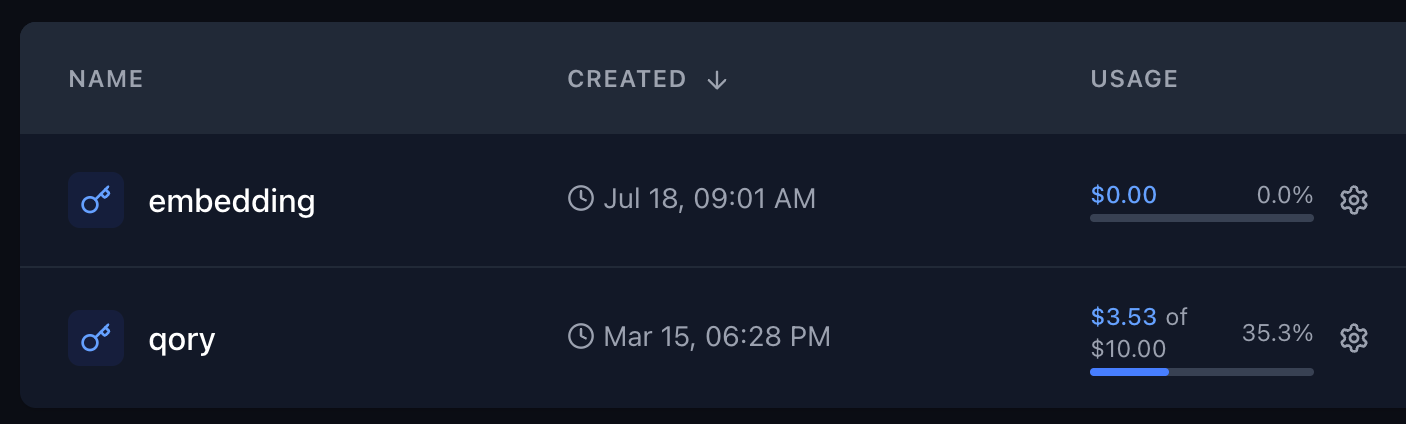
Requesty lets you control spending at the **API key** and **service account** level. Each API key or service account can have its own monthly spend cap.
**[Configure spend and rate limits](https://app.requesty.ai/api-keys)** in the Requesty Console.
**Looking for rate limits?** Requesty does not impose its own rate limits on your requests. If you hit a rate limit from an upstream provider (HTTP 429), the best solution is to create a [Routing Policy](#handling-provider-rate-limits) that automatically fails over to another model or provider.
## Per-API Key Spend Limits
**Use this method when:** Your team members do NOT have access to the Requesty web platform, and you need to distribute API keys directly.
### How it works:
* Organization admins generate API keys and share them with users
* Each API key has its own monthly spend cap
* Spending can be monitored via the dashboard or management API endpoints
* This method is ideal for external integrations or when you don't want to give users platform access
### Setting up per-key limits:
1. Go to [API Keys Page](https://app.requesty.ai/api-keys)
2. Create a new API key or edit an existing one
3. Set a monthly spending limit for that specific API key
4. Share the API key with the intended user
 ## Monitoring and Management
You can:
* Monitor spending in real-time through the dashboard
* Receive alerts when limits are approached
* Use the [Management API](/features/key-management-api) to programmatically check usage
* Adjust limits as needed based on usage patterns
## Handling Provider Rate Limits
When an upstream provider (OpenAI, Anthropic, Google, etc.) returns a **429 rate limit error**, Requesty can automatically retry with a different model or provider. The solution is to create a **Routing Policy**.
### Option 1: Fallback Policy
Create a [Fallback Policy](/features/fallback-policies) that tries the same model on a different provider, or falls back to an alternative model:
| Priority | Model | Retries |
| -------- | ------------------------------------------- | --------- |
| 1st | `anthropic/claude-sonnet-4-5` | 2 retries |
| 2nd | `bedrock/claude-sonnet-4-5-v2@eu-central-1` | 2 retries |
| 3rd | `openai/gpt-4.1` | 1 retry |
If the first model is rate limited, Requesty automatically tries the next one, your application never sees the 429 error.
### Option 2: Load Balancing Policy
Spread your traffic across multiple providers to stay under each provider's rate limits with a [Load Balancing Policy](/features/load-balancing-policies):
| Model | Weight |
| ---------------------------------------- | ------ |
| `anthropic/claude-sonnet-4-5` | 50% |
| `bedrock/claude-sonnet-4-5-v2@us-east-1` | 50% |
### Option 3: Latency Routing
Use [Latency-Based Routing](/features/latency-routing) to automatically pick the fastest available provider, rate-limited providers will have higher latency and be deprioritized.
### How to Create a Routing Policy
1. Go to [Routing Policies](https://app.requesty.ai/routing-policies) in the Requesty dashboard
2. Click **Create Policy**
3. Choose your policy type: **Fallback**, **Load Balancing**, or **Latency**
4. Give it a name (e.g., `rate-limit-safe`)
5. Add models, search and select from 300+ models, then drag to reorder
6. For fallback: set retry counts per model. For load balancing: set weight percentages (must total 100%)
7. Save the policy
Then use the policy in your API calls by setting the model to `policy/your-policy-name`:
```python theme={"dark"}
response = client.chat.completions.create(
model="policy/rate-limit-safe", # Use your routing policy
messages=[{"role": "user", "content": "Hello!"}]
)
```
You can also create policies scoped to a specific API key from the [API Keys](https://app.requesty.ai/api-keys) page. Organization-wide policies are managed from the [Routing Policies](https://app.requesty.ai/routing-policies) page.
## Best Practices
* **For internal teams:** Use per-API key or service account limits to give users autonomy while maintaining control
* **For external partners:** Use per-API key limits for simpler distribution and management
* **Set reasonable buffers:** Consider setting limits slightly above expected usage to avoid interruptions
* **Regular monitoring:** Check usage patterns monthly to optimize limit settings
* **For rate limits:** Create fallback policies across multiple providers to maximize throughput
## Monitoring and Management
You can:
* Monitor spending in real-time through the dashboard
* Receive alerts when limits are approached
* Use the [Management API](/features/key-management-api) to programmatically check usage
* Adjust limits as needed based on usage patterns
## Handling Provider Rate Limits
When an upstream provider (OpenAI, Anthropic, Google, etc.) returns a **429 rate limit error**, Requesty can automatically retry with a different model or provider. The solution is to create a **Routing Policy**.
### Option 1: Fallback Policy
Create a [Fallback Policy](/features/fallback-policies) that tries the same model on a different provider, or falls back to an alternative model:
| Priority | Model | Retries |
| -------- | ------------------------------------------- | --------- |
| 1st | `anthropic/claude-sonnet-4-5` | 2 retries |
| 2nd | `bedrock/claude-sonnet-4-5-v2@eu-central-1` | 2 retries |
| 3rd | `openai/gpt-4.1` | 1 retry |
If the first model is rate limited, Requesty automatically tries the next one, your application never sees the 429 error.
### Option 2: Load Balancing Policy
Spread your traffic across multiple providers to stay under each provider's rate limits with a [Load Balancing Policy](/features/load-balancing-policies):
| Model | Weight |
| ---------------------------------------- | ------ |
| `anthropic/claude-sonnet-4-5` | 50% |
| `bedrock/claude-sonnet-4-5-v2@us-east-1` | 50% |
### Option 3: Latency Routing
Use [Latency-Based Routing](/features/latency-routing) to automatically pick the fastest available provider, rate-limited providers will have higher latency and be deprioritized.
### How to Create a Routing Policy
1. Go to [Routing Policies](https://app.requesty.ai/routing-policies) in the Requesty dashboard
2. Click **Create Policy**
3. Choose your policy type: **Fallback**, **Load Balancing**, or **Latency**
4. Give it a name (e.g., `rate-limit-safe`)
5. Add models, search and select from 300+ models, then drag to reorder
6. For fallback: set retry counts per model. For load balancing: set weight percentages (must total 100%)
7. Save the policy
Then use the policy in your API calls by setting the model to `policy/your-policy-name`:
```python theme={"dark"}
response = client.chat.completions.create(
model="policy/rate-limit-safe", # Use your routing policy
messages=[{"role": "user", "content": "Hello!"}]
)
```
You can also create policies scoped to a specific API key from the [API Keys](https://app.requesty.ai/api-keys) page. Organization-wide policies are managed from the [Routing Policies](https://app.requesty.ai/routing-policies) page.
## Best Practices
* **For internal teams:** Use per-API key or service account limits to give users autonomy while maintaining control
* **For external partners:** Use per-API key limits for simpler distribution and management
* **Set reasonable buffers:** Consider setting limits slightly above expected usage to avoid interruptions
* **Regular monitoring:** Check usage patterns monthly to optimize limit settings
* **For rate limits:** Create fallback policies across multiple providers to maximize throughput